אינטגרציה של Slack

חברו בין Notion ל-Slack כדי שהצוות שלכם יוכל לעבוד טוב יותר מכל מקום 💬
מעבר לשאלות הנפוצותהאינטגרציה של Notion עם Slack מאפשרת תקשורת חלקה בין שתי הפלטפורמות. ניתן לשלוח הודעות Slack למאגרי ידע ב-Notion ולקבל התראות ב-Slack על פעילויות ב-Notion. המשיכו לקרוא כדי ללמוד על התכונות השונות של האינטגרציה וכיצד להגדיר אותן.
כדי לקבל התראות ב-Slack על דברים שקורים ב-Notion:
עוברים אל
הגדרותבסרגל הצד ←התראות.מצאו את
התראות ב-Slack.לחצו על
הוספת חשבון חדשובצעו את תהליך האימות.
כדי להגדיר התראות ב-Slack כחלק מאוטומציה של מאגר ידע:
בחר ב-
•••בראש מאגר הידע.בחרו ב-
אוטומציותוב-הוספת טריגר.לאחר מכן בחרו ב-
דף נוסףאו ב-מאפיין נערך←שלח התראת Slack אל...בחרו ערוץ Slack.
אם טרם עשיתם זאת, תתבקשו לחבר את חשבון ה-Slack שלכם.

Notion AI can find answers to your questions based on information from your Slack conversations. Learn more about this feature here →
כאשר הודעות Slack הופכות לפריט פעולה או רעיון חדש, שלחו אותן ישירות למאגר ידע ב-Notion כדי שלא יאבדו.
הקלידו את הפקודה
/notion createב-Slack, או לחצו על⋮לצד כל הודעת Slack ←שלח ל-Notion. ייתכן שתצטרכו לבחור ב-קיצורי דרך נוספים להודעות...כדי למצוא אפשרות זו.חפשו את מאגר הידע שבו תרצו שהדף החדש יופיע, או הדביקו את הקישור למאגר הידע. לאחר מכן, תנו לדף כותרת.
בחרו ב-
הוספת מאפייןכדי להוסיף מידע נוסף לדף החדש שלכם על בסיס המאפיינים הקיימים במאגר הידע.סמנו את התיבה לצד
אישור יצירת דף באופן ציבוריאם תרצו שאחרים בדיון ה-Slack שלכם יקבלו התראה על פריט מאגר הידע החדש שיצרתם.יש ללחוץ על
Save.

Note: The /notion create command only works at the Slack channel level, and not inside of Slack threads.
כדי ליצור משימת Notion ישירות מ-Slack:
הזינו את הפקודה
/notion taskב-Slack, או לחצו על⋮לצד כל הודעת Slack ←יצירת משימה ב-Notion. ייתכן שתצטרכו לבחורקיצורי דרך נוספים להודעות...כדי למצוא אפשרות זו.חפשו את Notion Projects שבו תרצו שהמשימה החדשה הזו תופיע או הדביקו את הקישור ל-Notion Projects. ניתן לתת למשימה שם, מקבל/ת ההקצאה, סטטוס, תאריך יעד ותיאור.
סמנו את התיבה לצד
אישור יצירת דף באופן ציבוריאם ברצונכם שאחרים בדיון ה-Slack שלכם יקבלו התראה על המשימה החדשה שיצרתם.יש ללחוץ על
Save.
Note: The /notion task command only works at the Slack channel level, and not inside of Slack threads.
קבלו התראות Slack כאשר דברים מסוימים קורים ב-Notion. ישנן שתי דרכים שבהן ניתן להגדיר התראות אלו:
ניתן לבחור לקבל התראות רק כאשר אתם מוזכרים בדף, בתגובה או במאפיין אדם במאגר ידע.
ניתן לבחור לקבל התראות כאשר כל האמור לעיל קורה, וכן כאשר:
קיבלתם תגובה בדף שבבעלותכם, או שתגובה נוספה לשרשור תגובות שאתם כבר חלק ממנו.
מאפיין שונה במאגר ידע שעבורו הגדרת התראות.
הוזמנתם לדף.
מישהו ביקש גישה לדף שבבעלותכם.
כדי להגדיר זאת:
עוברים אל
הגדרותבסרגל הצד ←התראות.פתחו את התפריט הנפתח לצד התראות Slack ובחרו את שם סביבת העבודה שלכם ב-Slack. ניתן גם לבחור
הוספת חשבון חדשאם אינכם רואים את סביבת העבודה שלכם ב-Slack ברשימה.הפעילו את
פעילות בסביבת העבודה שלכםכדי לקבל התראות על כל האמור לעיל. פעולה זו תפעיל אוטומטית גם אתאזכורי משתמש או קבוצה בלבד. אם ברצונכם לקבל התראות Slack רק כאשר אתם מוזכרים בסביבת העבודה שלכם, כבו אתפעילות בסביבת העבודה שלכם.
כיבוי התראות Slack
כדי להפסיק לקבל התראות ב-Slack:
עוברים אל
הגדרותבסרגל הצד ←התראות.פתחו את התפריט הנפתח לצד
התראות Slackובחרוכבוי.
Note: This feature is only available on paid plans.
כשאתם בונים כפתור, כפתור של מאגר ידע או אוטומציית מאגר ידע ב-Notion, ניתן להגדיר אותו לשליחת התראת Slack לערוץ Slack ספציפי. ניתן אפילו להתאים אישית את ההתראה עם:
טקסט עשיר כמו מודגש ונטוי.
היפר-קישורים.
אזכורי @ לדפי Notion ספציפיים, לאנשים או למרחב צוות.
משתנים דינמיים כמו
@nowו-@trigger.person(האדם שהפעיל את התראת ה-Slack).משתנים ספציפיים ל-Slack כמו
@channelו-@here.אמוג'ים.
בואו נסתכל על המקומות השונים שבהם ניתן לבנות אוטומציית התראות Slack ב-Notion.
בתוך כפתור
כשיוצרים כפתור בדף, ניתן להגדיר אותו לשליחת התראת Slack לערוץ Slack ספציפי. כדי לעשות זאת:
הוספת כפתור לדף.
תחת
Do this, בחרו ב-Add action←Send Slack notification to....בחרו את ערוץ ה-Slack שאליו תרצו שההתראה תישלח. בשלב זה, לא ניתן לבחור הודעות פרטיות (DMs).
בכל פעם שהכפתור יילחץ בעתיד, תישלח התראת Slack. למידע נוסף על כפתורים וכיצד להגדיר אותם here →
במאגר ידע
ניתן לקבל הודעה ב-Slack בכל פעם שמישהו מוסיף או מבצע שינוי בדף במאגר ידע.
לחצו על
•••בפינה הימנית העליונה של כל מאגר ידע ב-Notion.בחרו ב-
Automations.בחרו ב-
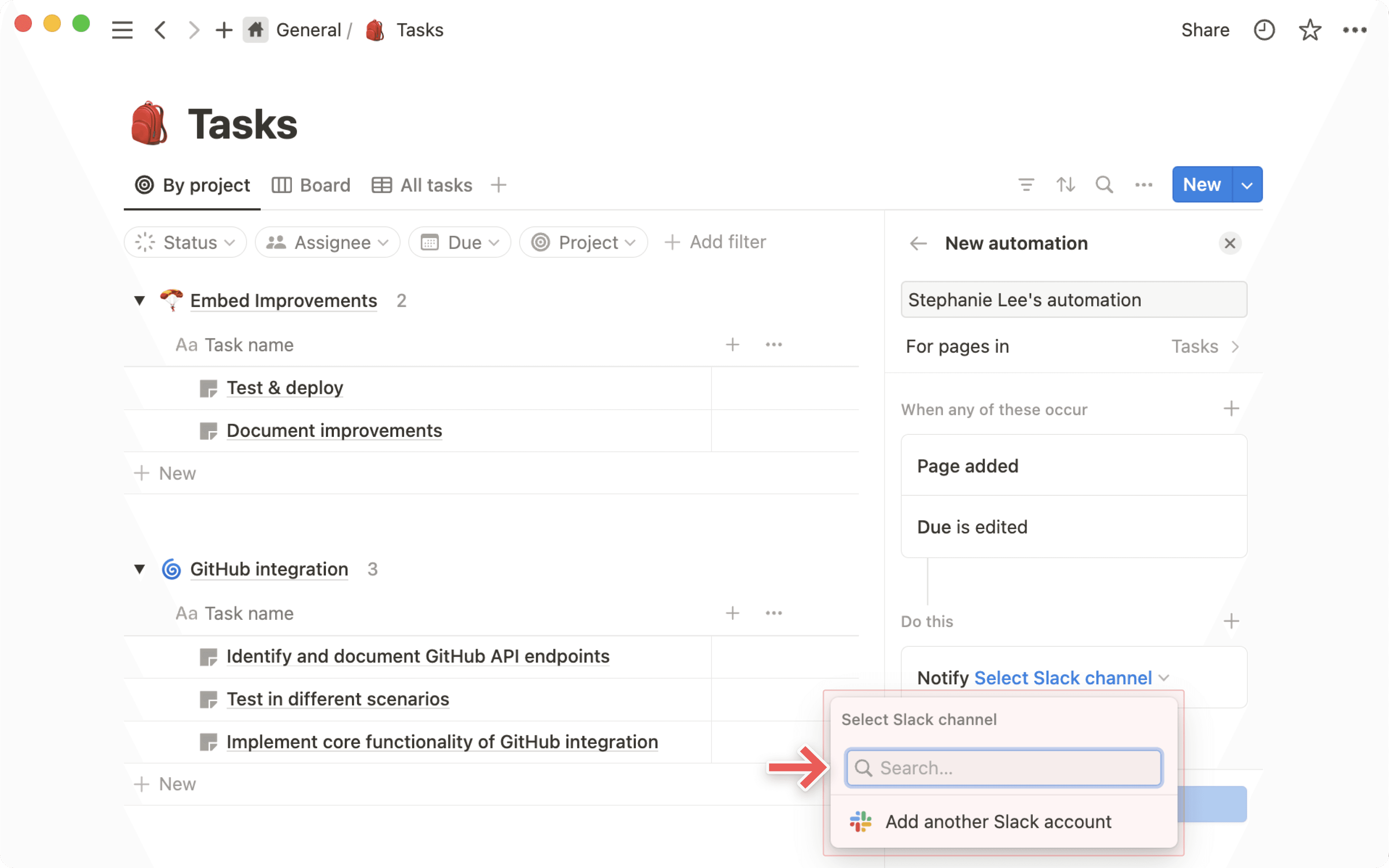
New automation.תנו שם להתראה ובחרו ב-
Add triggerכדי לבחור איזו פעולה תפעיל את האוטומציה, כגוןPage addedאוAny propertyשנערך.הוסיפו טריגרים נוספים במידת הצורך על ידי בחירה ב-
+.בוחרים ב-
הוספת פעולה←שליחת התראת Slack אל....בוחרים ערוץ יעד להתראה. בשלב זה, לא ניתן לבחור בהודעות פרטיות (DMs).
בלחצן של מאגר ידע
כשמוסיפים מאפיין לחצן למאגר הידע שלכם, ניתן להגדיר אותו כך שישלח התראת Slack לערוץ Slack ספציפי. כדי לעשות זאת:
מוסיפים מאפיין חדש במאגר ידע.
תחת
סוג, בוחרים ב-לחצן.תחת
Do this, בחרו ב-Add action←Send Slack notification to....בחרו את ערוץ ה-Slack שאליו תרצו שההתראה תישלח. בשלב זה, לא ניתן לבחור הודעות פרטיות (DMs).
בכל פעם שהלחצן יילחץ בעתיד, תישלח התראת Slack. למידע נוסף על לחצני מאגר ידע כאן ←
מעתיקים קישור מ-Slack ומדביקים אותו ב-Notion.
בתפריט שמופיע, בוחרים באפשרות
הדבקה כתצוגה מקדימה.
תראו תצוגה מקדימה של ההודעה, וכן מתי היא נשלחה, לאיזה ערוץ היא נשלחה וכמה תגובות יש לה. מידע זה יתעדכן ככל שיחולו בו שינויים; ניתן גם לבחור ב-••• ← טעינה מחדש של תצוגה מקדימה כדי לראות את העדכון האחרון.
כשמדביקים קישור של Notion ב-Slack, הוא ייפתח ויציג מידע שימושי על הדף שלכם. עבור דפי מאגר ידע עם מאפיין סיכום AI, Slack יפתח באופן אוטומטי את סיכום ה-AI.
ניתן גם להעניק הרשאות גישה לדף Notion שנפתח ישירות מתוך Slack.
בדף Notion, לוחצים על
שיתוף.לוחצים בתוך שורת החיפוש.
בוחרים ב-
הוספת אנשי קשר מ-Slack.מחפשים את האדם שרוצים להזמין, ואז בוחרים ב-
הזמנה.
שאלות נפוצות
Can I choose to use just one part of the integration?
Can I choose to use just one part of the integration?
Unfortunately, this is not possible today. When you install Notion’s Slack integration you’ll have the full functionality/all features of the Slack integration.
However, since only users with edit access to a page can set up Notion notifications to Slack, you can control parts of the integration by restricting permissions.
What permission level is required to create a database notification?
What permission level is required to create a database notification?
A user needs Full Access to a Notion database to be able to set up database notifications.
Anyone with at least View access to a database can see all the existing Slack notifications that have been set up. However, they can’t edit or create any themselves.
How do permissions work when I share a Notion page in a Slack channel?
How do permissions work when I share a Notion page in a Slack channel?
The user that shares the page will get a prompt informing them some people in the channel don't have access to the doc. The user is then able to decide if they want to share the page with the people that don't have access. They also have the option to delete the page preview in Slack.
Can admins control who can connect Slack to a Notion workspace?
Can admins control who can connect Slack to a Notion workspace?
As an admin in Slack you can manage settings that give you approval rights for any Slack integration. The same settings will apply to Notion if you choose to turn them on.
On Enterprise plans, Notion admins can also restrict members from installing the Slack integration using their admin permissions to manage connections.
Where can you view and manage the Slack notifications you've set up in your Notion workspace?
Where can you view and manage the Slack notifications you've set up in your Notion workspace?
Database notifications can be managed and edited in the the individual database they’ve been created in. There is currently no way to see all database notification workflows in your workspace from one central place.
Personal @-mention notifications can be managed from Settings → Notifications.
When one person connects Notion to Slack, does that turn it on for everyone?
When one person connects Notion to Slack, does that turn it on for everyone?
No, when one user sets up the integration all Slack users will be able to see an unfurled Notion page link or a Slack link preview in Notion.
But to use the functionality themselves, other users have to connect Slack individually.
How do I send Slack messages to a specific database view?
How do I send Slack messages to a specific database view?
The easiest way to send a Slack message to a specific database view (e.g. you might have a view for only your team’s tasks), is to copy the link to the database view and paste that link into the send to Notion prompt in Slack.
When you send a Slack message to a specific database view, the properties are auto-filled for you. No need to update them yourself manually!
Does the @-mentioned notification in Slack work when a user is mentioned as part of a group @-mention in Notion?
Does the @-mentioned notification in Slack work when a user is mentioned as part of a group @-mention in Notion?
Yes. A group mention in Notion will trigger the @mention notification in Slack to all members of the Notion group that have the Slack @mention turned on.
Are there other 3rd party integrations providers and can I continue to use them (e.g. Zapier)?
Are there other 3rd party integrations providers and can I continue to use them (e.g. Zapier)?
Yes. Those integrations will continue to work as before.