建立、加入與離開工作空間

當你剛開始使用 Notion 時,最好保持簡單,先從一個工作空間開始。但隨著你開始將 Notion 用於更多事務,並與更多群組的人員協作,你可以透過使用多個工作空間來區隔不同類型的內容 🏘
跳至常見問題預設情況下,你的工作空間切換器會顯示所有與你的電子郵件(地址)相關聯的工作空間。若要建立另一個工作空間:
開啟 Notion 視窗左上角的工作空間切換器。
選擇你希望與新工作空間相關聯的電子郵件(地址)帳號,並點擊該電子郵件(地址)右側的
•••。點擊
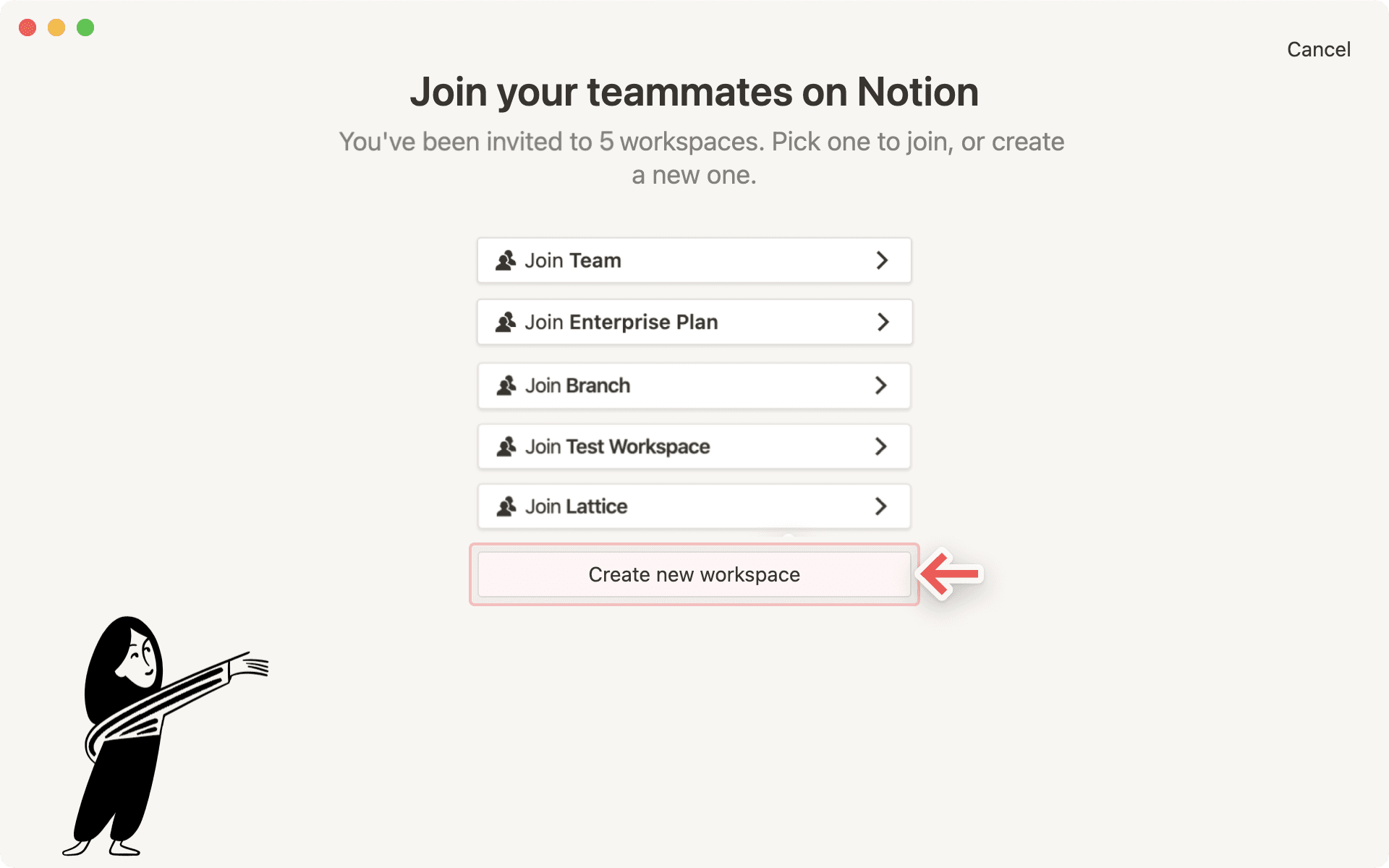
加入或建立工作空間。如果你使用的是公司電子郵件,可能會看到一個你可以自動加入的工作空間列表。我們將在下方說明!
如果你想建立一個全新的工作空間,請捲動至現有工作空間列表下方,並點擊
建立工作空間。按照步驟設定你的新工作空間,這樣就完成了!

Tip: Multiple workspaces come in handy to separate different kinds of work. For example, you could have one workspace for personal stuff, one for school notes, and one for keeping track of freelance projects.
有幾種方式可以加入他人建立的工作空間:
該工作空間的管理員將你新增為成員,你會收到一封包含加入連結的電子郵件(地址)。系統會提示你使用電子郵件(地址)登入,接著你就會以付費成員的身分進入該工作空間。
如果你的電子郵件網域(例如 name@domain.com)已啟用自動加入功能,你可以使用工作空間切換器中的
加入或建立工作空間按鈕,即可看到你可以加入的工作空間列表。

Note: If you're using Notion with a personal email address such as gmail.com or outlook.com, or a school email address such as nyu.edu, you won't be able to auto-join other workspaces.
To join a workspace from another email account, use the Add another account button in the workspace switcher.
在一天之中,你可能需要在不同的工作空間之間切換以完成工作。只需點擊目前工作空間的名稱,並從下拉式選單中選擇你想前往的工作空間即可。就是這麼簡單!
你也可以從工作空間切換器存取 設定。
Tip: On desktop, you can use the shortcut ctrl + shift + # to switch workspaces, in which # corresponds to the placement of each workspace in the dropdown workspace switcher menu.
一旦你離開工作空間:
你將無法再存取其中的所有內容。若有任何想保留的資料,建議你在離開工作空間前先進行 匯出。
它將會從你的工作空間切換器中移除。
如果您想再次存取工作空間,可以請管理員將您重新加入。
若要離開工作空間:
前往側邊欄中的
設定。在
工作空間下方,選擇General。向下捲動至
危險區域並選擇離開工作空間。
預設情況下,您的工作空間切換器會顯示與您電子郵件(地址)相關聯的所有工作空間。但您可能偏好將個人電子郵件用於個人工作空間,並將工作電子郵件用於團隊工作空間。
為了讓您能同時檢視所有工作空間,我們支援同時登入多個帳號!
若要從另一個 Notion 帳號新增工作空間,請開啟 Notion 視窗左上角的工作空間切換器,然後點擊
Add another account。請依照步驟登入您的另一個帳號,系統會直接將您帶往該工作空間。您也可以在此步驟建立新帳號。
下次開啟工作空間切換器時,您就會看到新帳號及其所有工作空間已新增至下拉式選單中。
Tip: By adding more accounts to your workspace switcher, there's no need to log out of one account in order to log into another! This lets you keep work and life separate, while making sure that you can access any of your content across any account, on any device, completely seamlessly.
您可以登出個別帳號,或一次登出所有帳號。
開啟 Notion 視窗左上角的工作空間切換器。
若要登出其中一個帳號但保持其他帳號的登入狀態,請使用您想登出之帳號右側的
•••按鈕。然後,點擊Log out。若要一次登出所有帳號,請使用工作空間切換器底部的
Log out all按鈕。
Note: Login tokens expire after 90 days. When you're logged out of your accounts due to token expiration, you will need to re-add any additional accounts by using the Add another account button in the workspace switcher.
常見問題
我該如何將我所有的 Notion 內容遷移到另一個工作空間?
我該如何將我所有的 Notion 內容遷移到另一個工作空間?
提示:任何遷移的內容都會被複製到新的工作空間,且這些頁面有時會出現問題。如需更多資訊,請點擊此處。
若要將內容從一個工作空間移動到同一個帳號下的另一個工作空間,請點擊側邊欄中每個頂層頁面旁邊的 •••(或按右鍵)並選擇 移動到。在移動選單的底部,您會看到一個下拉式選單,可用於選取不同的工作空間。
當您移動頂層頁面時,其所有子頁面也會隨之移動。它們會出現在 私人 區塊中,但您可以將其移動到任何您想放置的位置。
我點擊了「加入或建立工作空間」/按鈕,但它只讓我建立工作空間。我該如何加入工作空間?
我點擊了「加入或建立工作空間」/按鈕,但它只讓我建立工作空間。我該如何加入工作空間?
僅當該工作空間已啟用 已允許的電子郵件網域 設定,使與您相同網域的使用者能自動加入時,您才能透過 加入或建立工作空間 按鈕加入該工作空間。
否則,您需要請工作空間的管理員發送邀請給您。
When I subscribe to a paid plan, does it cover all of my workspaces?
When I subscribe to a paid plan, does it cover all of my workspaces?
Paid plans only apply to one workspace and don't cover the whole account. Workspaces are completely separate silos, so you won't be able to link any content between them.
We recommend using the least number of workspaces possible, and taking advantage of top-level pages in your sidebar to stay organized.
How can I switch between workspaces that are under different email addresses?
How can I switch between workspaces that are under different email addresses?
To add your workspaces from another email account, use the Add another account button in the workspace switcher at the top left of your Notion window, and follow the steps to login to your other account.
Is there a limit to the number of accounts I can be signed into?
Is there a limit to the number of accounts I can be signed into?
There is currently no limit, although you may experience slower performance if you're logged into 10+ accounts at once.
I forgot to log out of my account on a public computer, or my device was stolen.
I forgot to log out of my account on a public computer, or my device was stolen.
If you're still logged in on a device you have access to, navigate to Settings → {your name} → Log out of all devices.
If you no longer have access to your account, please send us a quick message to [email protected], or use the Notion AI face at the bottom right of the app. We can log you out remotely!