Track usage in the Notion credits dashboard
Learn how to use the Notion credits dashboard to track usage, plan future credit needs, and manage ongoing spend 📈
ข้ามไปยังคำถามที่พบบ่อยThe Notion credits dashboard gives a clear view of how Custom Agents, Autofill, and Workers use Notion credits across the workspace. Use it to track usage, plan future credit needs, and manage ongoing spend. To access it, go to Settings → Access & billing → Notion credits.
Admins on Business and Enterprise plans can monitor usage in the dashboard. Custom Agent creators and Worker creators can also see workspace-level credit pacing. The table will show only the Custom Agents or Workers they've created.
In the dashboard, you can monitor:
Credit usage in real time.
Estimated usage through your monthly service date.
Agent-level runs and credit usage, so you can identify the agents driving spend and adjust them as needed.
If you manage multiple workspaces, you’ll also have a Notion credits dashboard in your admin console where you can track credit pacing and usage across your organization.
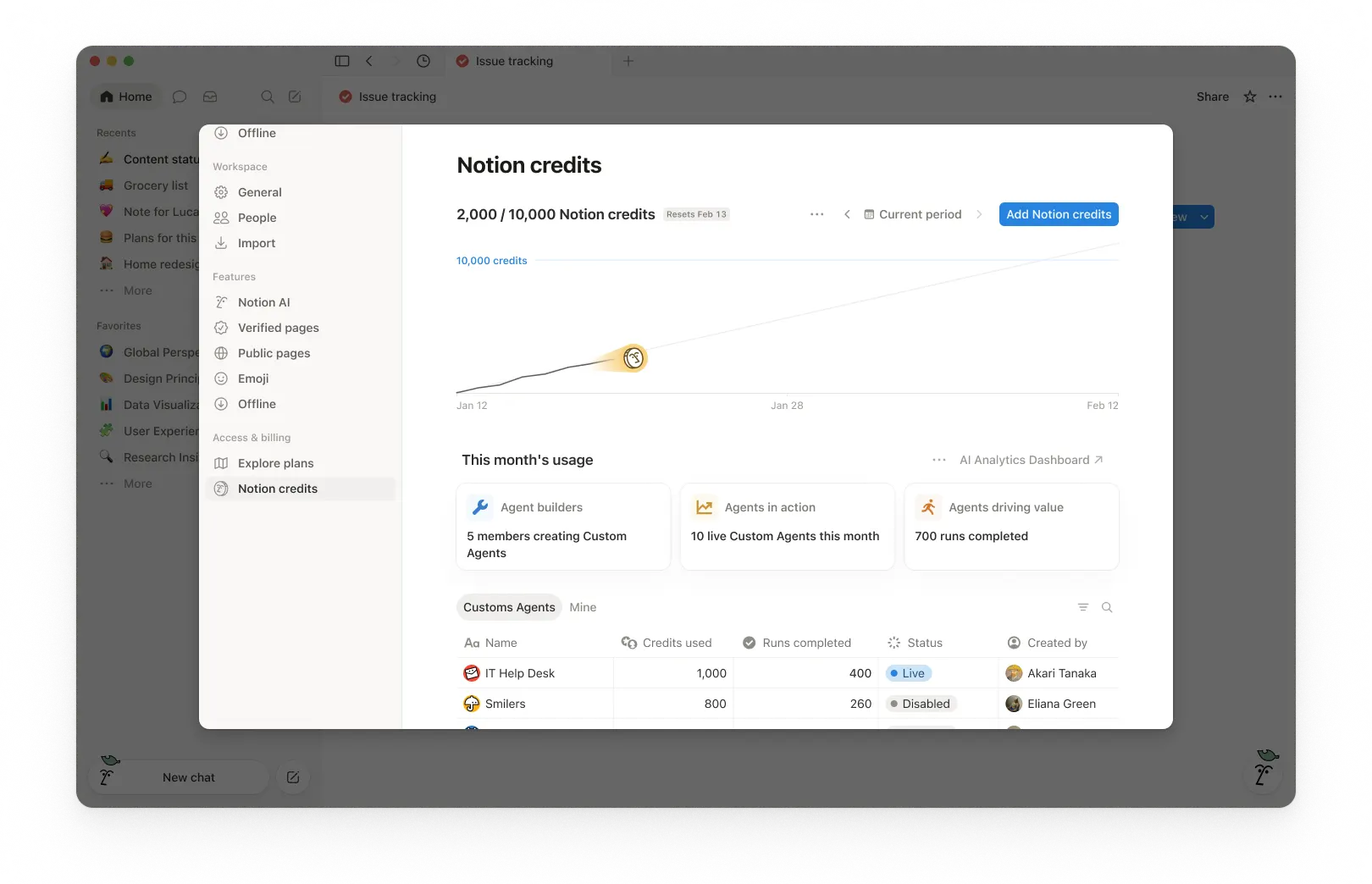
1. Usage summary
At the top of the dashboard, you’ll see the total Notion credits used for the selected period and your credits reset date. The selected period is based on your workspace’s billing cycle.
This gives you a quick snapshot of usage so far and when your monthly billing cycle ends.
2. Time period controls
In the top-right corner, use the period selector (for example, Current period) and navigation arrows to review past periods.
3. Usage chart
The usage chart shows credit usage over time:
Current shows your actual credits used so far.
Estimated projects where your usage is likely to land by the reset date if current patterns continue. The estimate is provided for informational purposes only and actual future usage may differ.
Use this to spot whether you’re pacing toward running out of credits before the reset.
4. Workspace usage cards
Under This month’s usage, you’ll see adoption and activity metrics such as:
Agent builders: How many members are creating Custom Agents.
Agents in action: How many live Custom Agents are running during the period.
Runs completed: How many tasks agents have completed across your workspace.
5. Usage breakdown
The usage table is organized into tabs so you can filter by type.
All: Every Custom Agent, Autofill, and Worker in your workspace.
Custom Agents: Custom Agent spend only.
Autofill: Autofill spend only.
Workers: Worker spend only. Workers show a Free badge during the beta period.
Mine: Only the Custom Agents and Workers you created
For each item, the table shows:
Notion credits used
Runs completed
Status
Created by
Include Worker spend in the main chart
By default, Worker spend is tracked separately from Custom Agent spend and isn't included in the main usage chart or total credit number. To fold Worker spend into the chart and total, select the three-dot menu ••• at the top of the dashboard and toggle on Include Worker spend.
What actions can an admin take to manage credit pacing?
Admins can monitor credit usage and control how Custom Agents run so spend stays predictable.
Admins have several ways to manage credit pacing:
Visibility: Track usage and trends in the Notion credits dashboard.
Guardrails: Decide who can create agents (and set limits).
Control: Pause or switch off agents anytime to stop usage while you investigate or make changes.
Optimize: Fine-tune agents to reduce extra steps and improve efficiency.
1. Monitor usage to know what’s driving spend
Use the Notion credits dashboard to track usage over time and see which features are using the most credits. Notion also notifies admins when the workspace is approaching or has reached the credit limit, so admins have time to act.
2. Set guardrails to prevent surprises
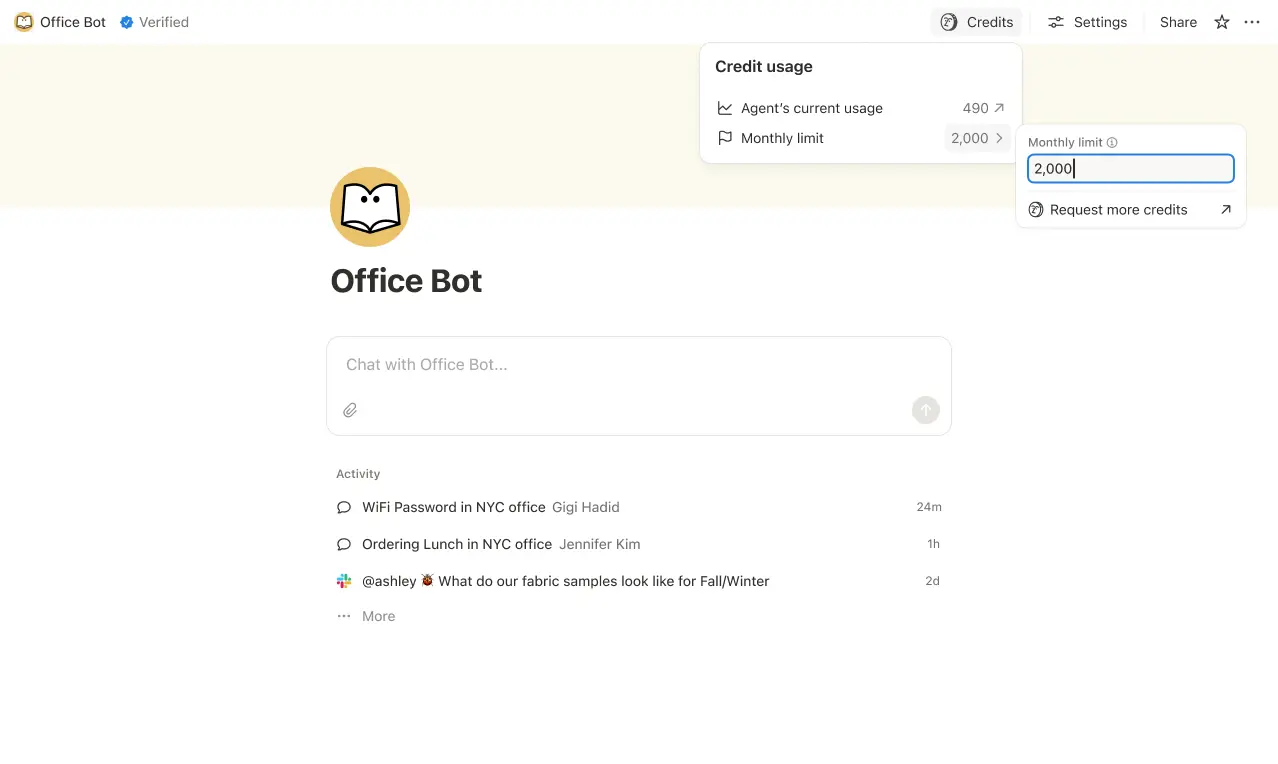
Set credit limits for individual Custom Agents so they pause when they hit a threshold. In some cases, an agent may go over the limit in order to complete an ongoing task. If a task is already running when it hits the cap, we let it finish before stopping new usage.
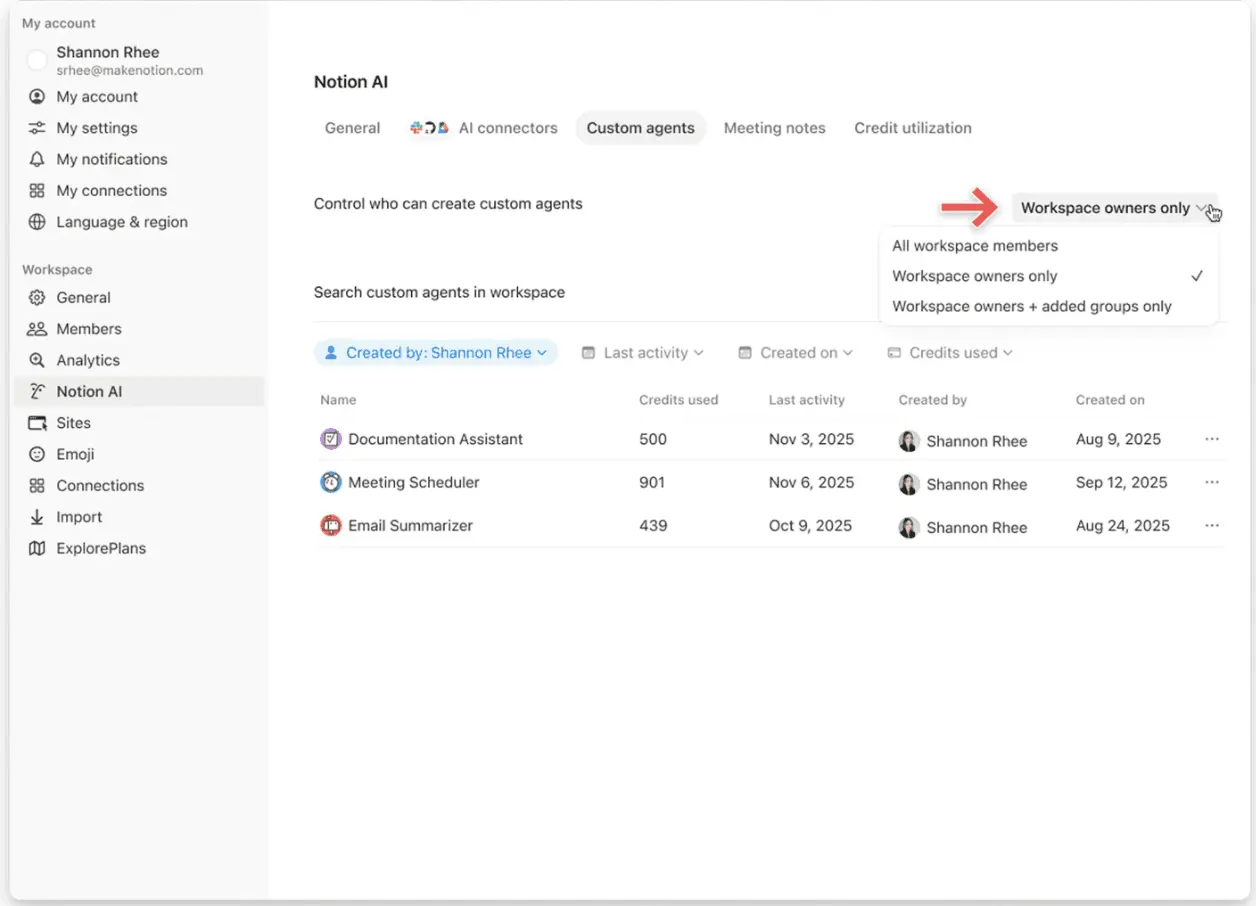
Control who can create Custom Agents (everyone, workspace owners only, or selected members).
3. Intervene quickly to stop usage
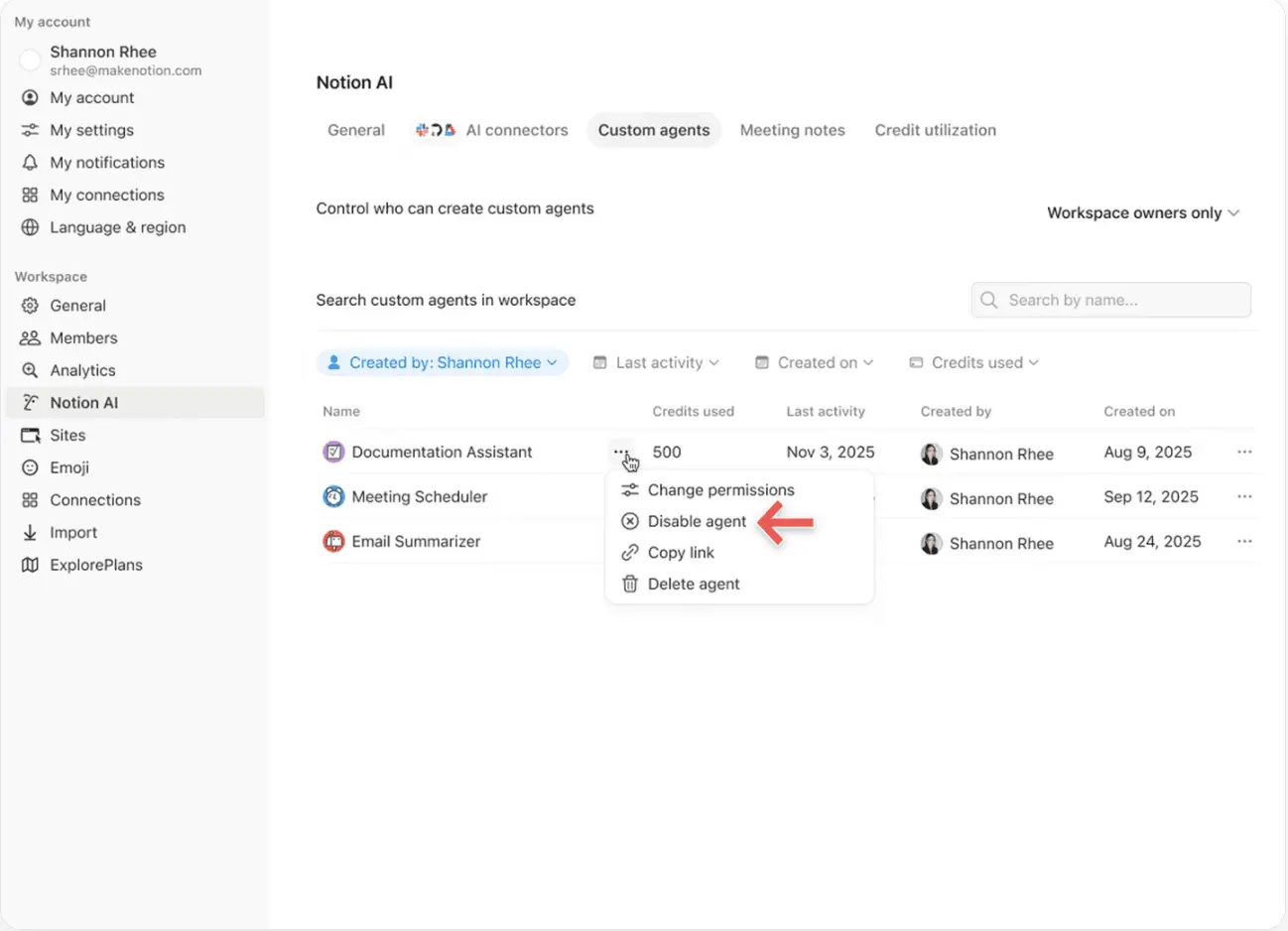
Pause or switch off a Custom Agent anytime to immediately stop credit usage while you review activity or adjust the agent.
4. Use Insights to optimize performance
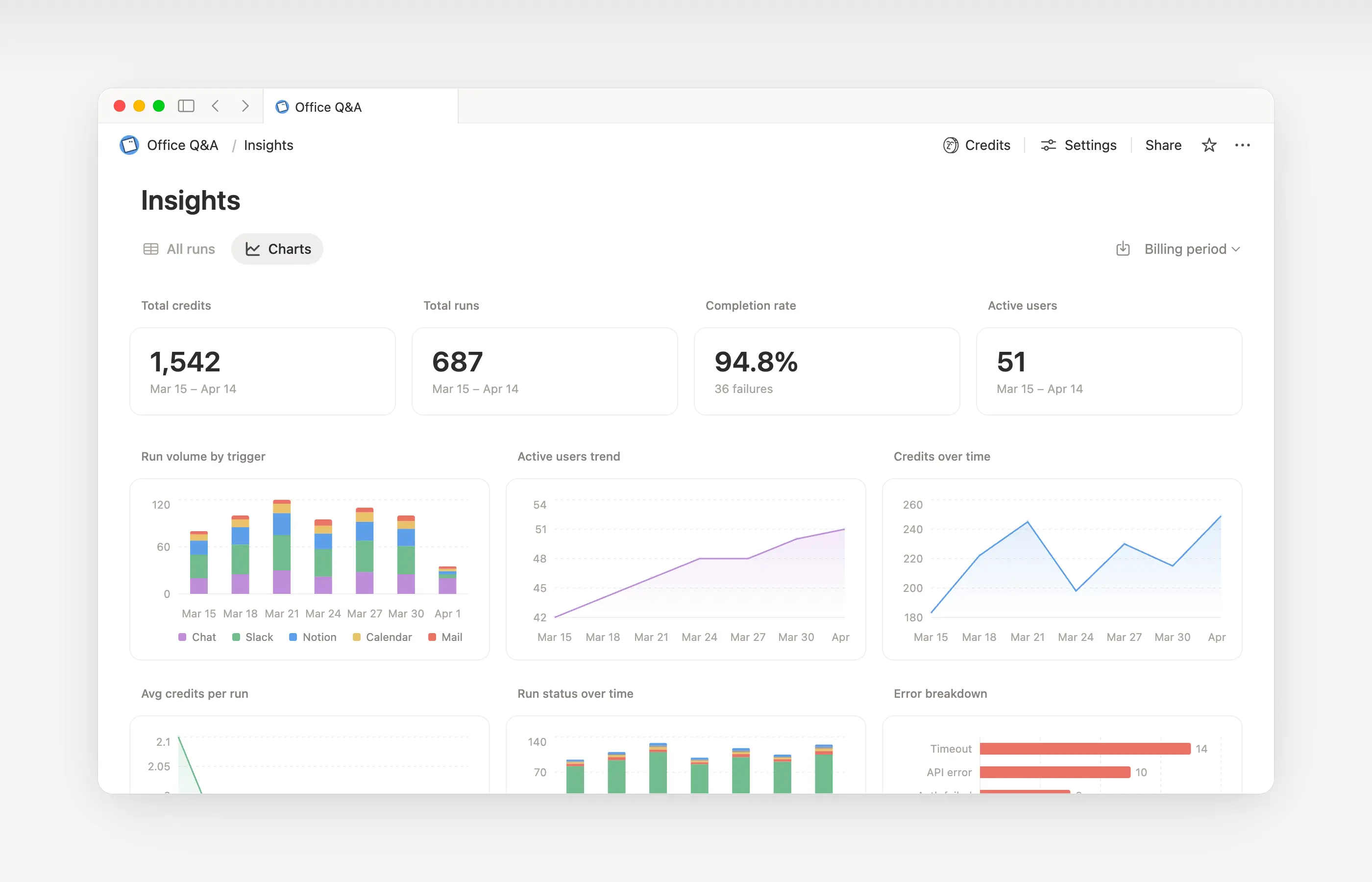
Insights helps Custom Agent creators and workspace admins understand activity so they can make targeted updates that improve performance. Use Insights to spot runs that take extra steps, fail and retry, or use a more expensive model than the job requires. Then, update the agent’s instructions or settings so it runs more efficiently.
Open Insights directly within an agent to:
Monitor your Custom Agent’s activity and credit usage.
Identify runs that are more expensive than expected.
Review what models, tools, and triggers were used.
Find and fix failed runs so your agent works more reliably.
Learn more about how to use Insights to reduce costs and improve a Custom Agent →

Learn what Custom Agents are and how they work.
Learn how Custom Agents access information, how sharing works, and what admins can control: Custom Agents sharing and permissions →
See more best practices on optimizing Notion credits and efficiency for Custom Agents in an admin’s guide to getting started with Custom Agents →
คำถามที่พบบ่อย
จะเกิดอะไรขึ้นหากเราใช้เครดิต Notion หมด?
จะเกิดอะไรขึ้นหากเราใช้เครดิต Notion หมด?
หากพื้นที่ทำงานของคุณมีเครดิต Notion ไม่เพียงพอ เอเจนต์เฉพาะกิจจะหยุดทำงานโดยอัตโนมัติจนกว่าเครดิตจะรีเซ็ทหรือผู้ดูแลระบบจะเพิ่มเครดิตให้มากขึ้น
ผู้ดูแลระบบจะได้รับการแจ้งเตือนก่อนที่เครดิต Notion จะหมดได้อย่างไร?
ผู้ดูแลระบบจะได้รับการแจ้งเตือนก่อนที่เครดิต Notion จะหมดได้อย่างไร?
ผู้ดูแลระบบจะได้รับการแจ้งเตือนในแอป (และทางอีเมล) เมื่อพื้นที่ทำงานของคุณมีการใช้เครดิต Notion ถึง 80% และ 100% เพื่อให้คุณมีเวลาปรับเปลี่ยน ก่อนที่เอเจนต์เฉพาะกิจจะหยุดทำงาน
ฉันจะซื้อเครดิต Notion เพิ่มเติมได้อย่างไร?
ฉันจะซื้อเครดิต Notion เพิ่มเติมได้อย่างไร?
ผู้ดูแลระบบสามารถซื้อเครดิต Notion ได้ทั้งในตัวผลิตภัณฑ์หรือผ่านทีมดูแลลูกค้าของคุณ เรียนรู้เพิ่มเติมเกี่ยวกับวิธี การซื้อเครดิต Notion
การเปลี่ยนแปลงเครดิต Notion กลางเดือนทำงานอย่างไร?
การเปลี่ยนแปลงเครดิต Notion กลางเดือนทำงานอย่างไร?
หากคุณเพิ่มเครดิตในช่วงกลางของรอบบริการรายเดือน เครดิตเพิ่มเติมจะพร้อมใช้งานทันทีในรอบปัจจุบัน และคุณจะถูกเรียกเก็บเงินสำหรับยอดเครดิตแบบเรียกเก็บซ้ำที่สูงขึ้นเมื่อถึงวันเริ่มต้นรอบบริการรายเดือนถัดไป
หากคุณลดเครดิตในช่วงกลางของรอบบริการรายเดือน ยอดเครดิตที่ลดลงจะมีผลเมื่อเริ่มต้นรอบบริการถัดไป และนับจากนั้น คุณจะถูกเรียกเก็บเงินตามยอดเครดิตแบบเรียกเก็บซ้ำที่ต่ำกว่าในแต่ละเดือน
ฉันทำงานร่วมกับทีมดูแลลูกค้าเพื่อซื้อเครดิต Notion แล้วจะเกิดอะไรขึ้นหากฉันอัปเกรด ขยาย หรือ ต่ออายุแผน Business หรือ Enterprise ซึ่งรวมเครดิต Notion รายปี เมื่ออยู่ในช่วงกลางรอบการเรียกเก็บเงิน?
ฉันทำงานร่วมกับทีมดูแลลูกค้าเพื่อซื้อเครดิต Notion แล้วจะเกิดอะไรขึ้นหากฉันอัปเกรด ขยาย หรือ ต่ออายุแผน Business หรือ Enterprise ซึ่งรวมเครดิต Notion รายปี เมื่ออยู่ในช่วงกลางรอบการเรียกเก็บเงิน?
คุณจะได้รับเครดิตตามสัดส่วนสำหรับเครดิต Notion รายปีที่ชำระเงินล่วงหน้าที่ยังไม่ได้ใช้ โดยคำนวณจากค่าน้อยที่สุดจาก:
จำนวนเงินดอลลาร์ของเครดิต Notion รายปีที่ยังไม่ได้ใช้ หรือ
ค่าธรรมเนียมเครดิต Notion รายปีที่คิดตามสัดส่วนสำหรับระยะเวลาที่เหลืออยู่ในช่วงการสมัครสมาชิก
เครดิตนี้จะมีผลเมื่อแบบฟอร์มคำสั่งซื้อ Business หรือ Enterprise ใหม่เข้ามาแทนที่แบบฟอร์มปัจจุบันของคุณก่อนสิ้นสุดระยะเวลาการสมัครสมาชิก เครดิต Notion ไม่มีมูลค่าเป็นเงินสด เครดิตใดๆ จะถูกนำไปใช้กับแผนใหม่
ป้อนข้อความอัตโนมัติ ใช้เครดิต Notion หรือไม่?
ป้อนข้อความอัตโนมัติ ใช้เครดิต Notion หรือไม่?
ป้อนข้อความอัตโนมัติมีสองตัวเลือก: Basic และเอเจนต์เฉพาะกิจ
ป้อนข้อความอัตโนมัติแบบพื้นฐาน (Basic Autofill) รวมอยู่ในแผน Business และ Enterprise และไม่ใช้เครดิต Notion
ป้อนข้อความอัตโนมัติด้วยเอเจนต์เฉพาะกิจ (Custom Agent Autofill) ใช้เครดิต Notion เนื่องจากทำงานด้วยความสามารถของเอเจนต์เฉพาะกิจ (เช่น การใช้บริบทที่สมบูรณ์ยิ่งขึ้นและการใช้เหตุผลขั้นสูง)
จะเกิดอะไรขึ้นกับเอเจนต์เฉพาะกิจหากฉันลดระดับแผนของฉัน?
จะเกิดอะไรขึ้นกับเอเจนต์เฉพาะกิจหากฉันลดระดับแผนของฉัน?
หากคุณลดระดับแผน Notion ของคุณเป็น Free หรือ Plus เอเจนต์เฉพาะกิจที่มีอยู่ทั้งหมดจะถูกปิดใช้งาน แต่จะไม่ถูกลบ คุณสามารถดู (แต่แก้ไขไม่ได้) หน้าแชทและการตั้งค่าของเอเจนต์เฉพาะกิจได้ เอเจนต์เฉพาะกิจสามารถทำงานต่อได้หากคุณอัปเกรดกลับเป็นแผน Business หรือ Enterprise
ฉันสามารถซื้อเครดิต Notion ได้หรือไม่หากฉันจัดการการสมัครสมาชิกผ่าน App Store หรือ Google Play?
ฉันสามารถซื้อเครดิต Notion ได้หรือไม่หากฉันจัดการการสมัครสมาชิกผ่าน App Store หรือ Google Play?
ไม่ได้โดยตรง หากการสมัครสมาชิก Notion ของคุณจัดการผ่านร้านค้าแอปบนมือถือ (Apple App Store หรือ Google Play) คุณจะไม่สามารถซื้อเครดิต Notion จากภายใน Notion ได้
ในการซื้อเครดิต คุณจะต้อง:
ยกเลิกการสมัครสมาชิกผ่านร้านค้าแอปบนมือถือของคุณ
อัปเกรดเป็นแผน Notion โดยตรงบน notion.com (แผน Business หรือ Enterprise ที่รวม AI ไว้ด้วย)
เมื่อการสมัครสมาชิกใหม่ของคุณเปิดใช้งานแล้ว ผู้ดูแลสามารถซื้อเครดิต Notion ได้จาก
การตั้งค่า→การเข้าถึงและการเรียกเก็บเงิน→เครดิต Notion
ตรวจสอบให้แน่ใจว่าแผนใหม่ของคุณรวม AI ไว้ด้วยก่อนที่จะซื้อเครดิต เครดิต Notion มีให้ใช้งานเฉพาะในแผน Business และ Enterprise เท่านั้น