Track usage in the Notion credits dashboard
Learn how to use the Notion credits dashboard to track usage, plan future credit needs, and manage ongoing spend 📈
Buka Pertanyaan UmumThe Notion credits dashboard gives a clear view of how Custom Agents, Autofill, and Workers use Notion credits across the workspace. Use it to track usage, plan future credit needs, and manage ongoing spend. To access it, go to Settings → Access & billing → Notion credits.
Admins on Business and Enterprise plans can monitor usage in the dashboard. Custom Agent creators and Worker creators can also see workspace-level credit pacing. The table will show only the Custom Agents or Workers they've created.
In the dashboard, you can monitor:
Credit usage in real time.
Estimated usage through your monthly service date.
Agent-level runs and credit usage, so you can identify the agents driving spend and adjust them as needed.
If you manage multiple workspaces, you’ll also have a Notion credits dashboard in your admin console where you can track credit pacing and usage across your organization.
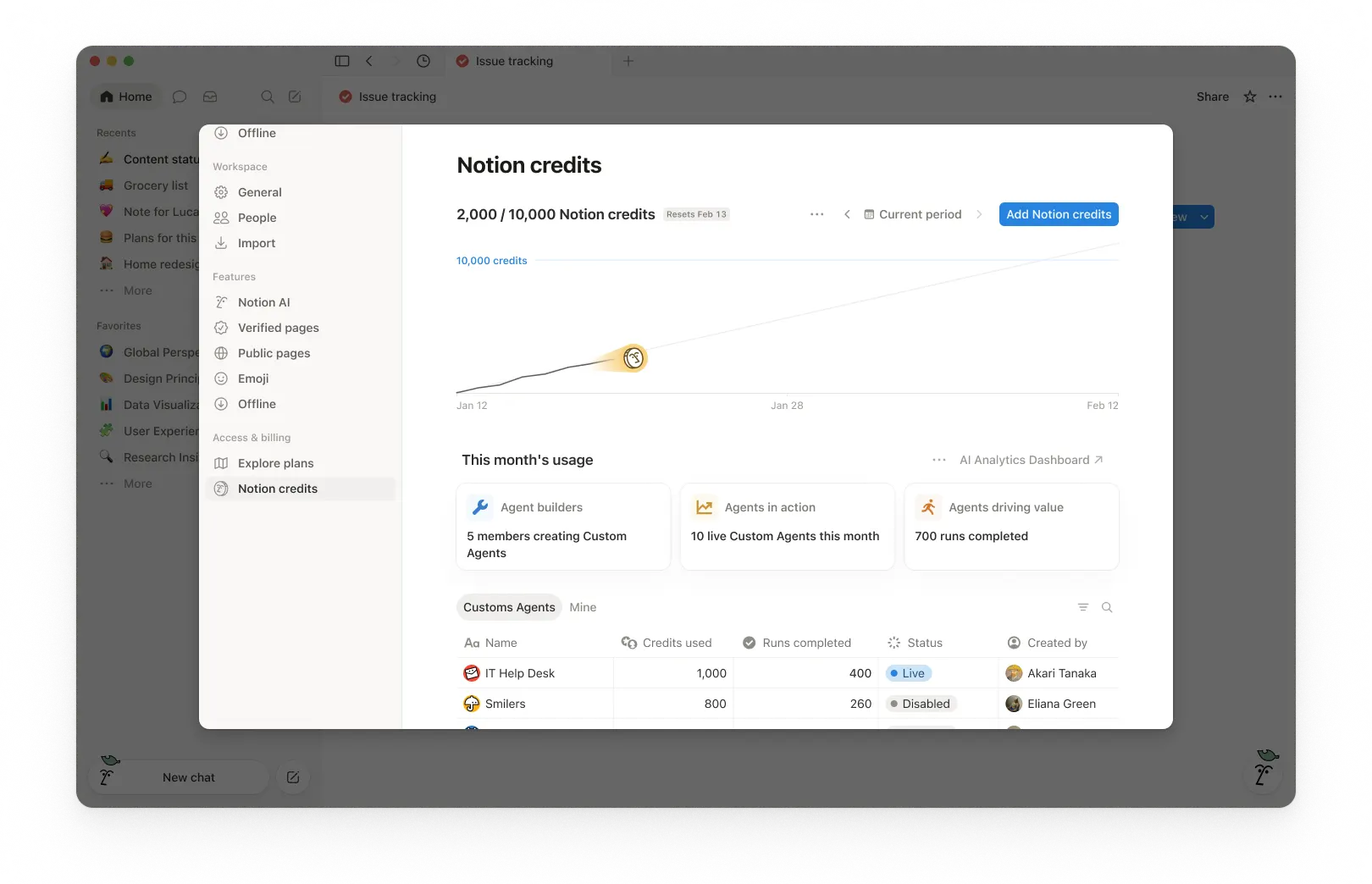
1. Usage summary
At the top of the dashboard, you’ll see the total Notion credits used for the selected period and your credits reset date. The selected period is based on your workspace’s billing cycle.
This gives you a quick snapshot of usage so far and when your monthly billing cycle ends.
2. Time period controls
In the top-right corner, use the period selector (for example, Current period) and navigation arrows to review past periods.
3. Usage chart
The usage chart shows credit usage over time:
Current shows your actual credits used so far.
Estimated projects where your usage is likely to land by the reset date if current patterns continue. The estimate is provided for informational purposes only and actual future usage may differ.
Use this to spot whether you’re pacing toward running out of credits before the reset.
4. Workspace usage cards
Under This month’s usage, you’ll see adoption and activity metrics such as:
Agent builders: How many members are creating Custom Agents.
Agents in action: How many live Custom Agents are running during the period.
Runs completed: How many tasks agents have completed across your workspace.
5. Usage breakdown
The usage table is organized into tabs so you can filter by type.
All: Every Custom Agent, Autofill, and Worker in your workspace.
Custom Agents: Custom Agent spend only.
Autofill: Autofill spend only.
Workers: Worker spend only. Workers show a Free badge during the beta period.
Mine: Only the Custom Agents and Workers you created
For each item, the table shows:
Notion credits used
Runs completed
Status
Created by
Include Worker spend in the main chart
By default, Worker spend is tracked separately from Custom Agent spend and isn't included in the main usage chart or total credit number. To fold Worker spend into the chart and total, select the three-dot menu ••• at the top of the dashboard and toggle on Include Worker spend.
What actions can an admin take to manage credit pacing?
Admins can monitor credit usage and control how Custom Agents run so spend stays predictable.
Admins have several ways to manage credit pacing:
Visibility: Track usage and trends in the Notion credits dashboard.
Guardrails: Decide who can create agents (and set limits).
Control: Pause or switch off agents anytime to stop usage while you investigate or make changes.
Optimize: Fine-tune agents to reduce extra steps and improve efficiency.
1. Monitor usage to know what’s driving spend
Use the Notion credits dashboard to track usage over time and see which features are using the most credits. Notion also notifies admins when the workspace is approaching or has reached the credit limit, so admins have time to act.
2. Set guardrails to prevent surprises
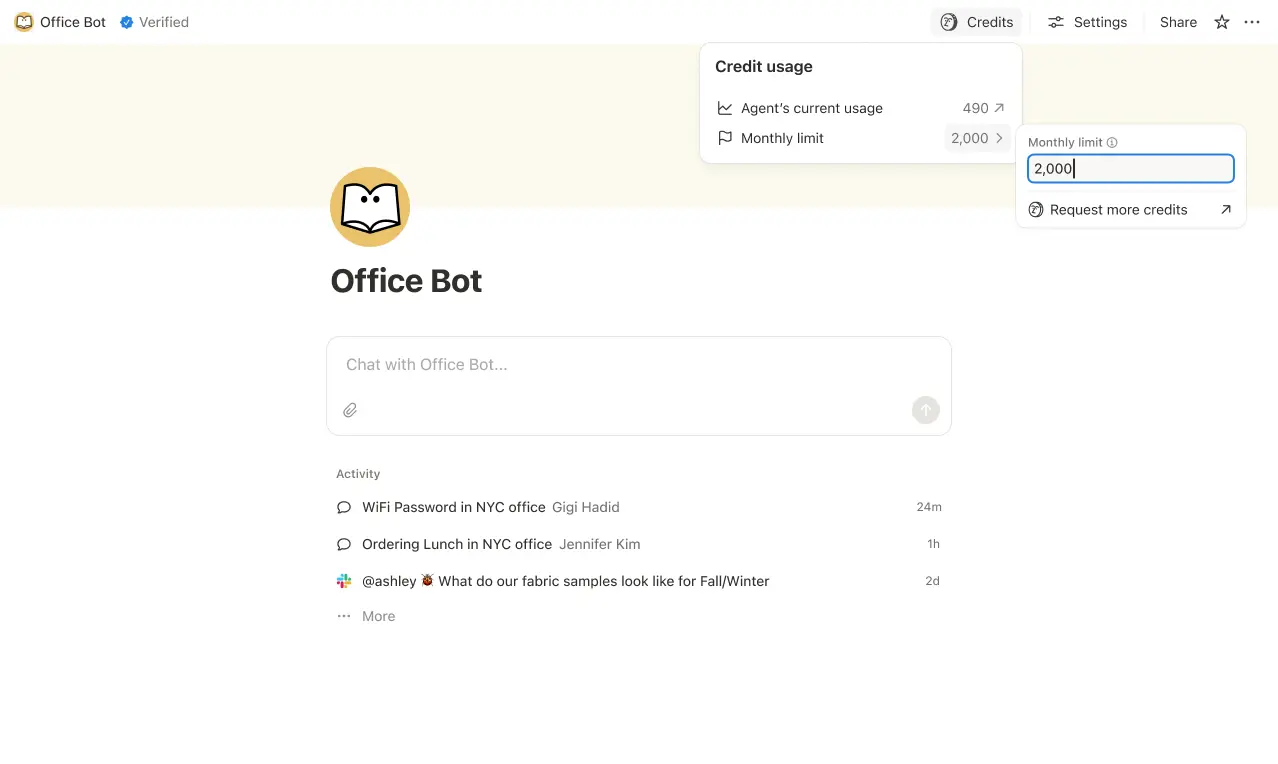
Set credit limits for individual Custom Agents so they pause when they hit a threshold. In some cases, an agent may go over the limit in order to complete an ongoing task. If a task is already running when it hits the cap, we let it finish before stopping new usage.
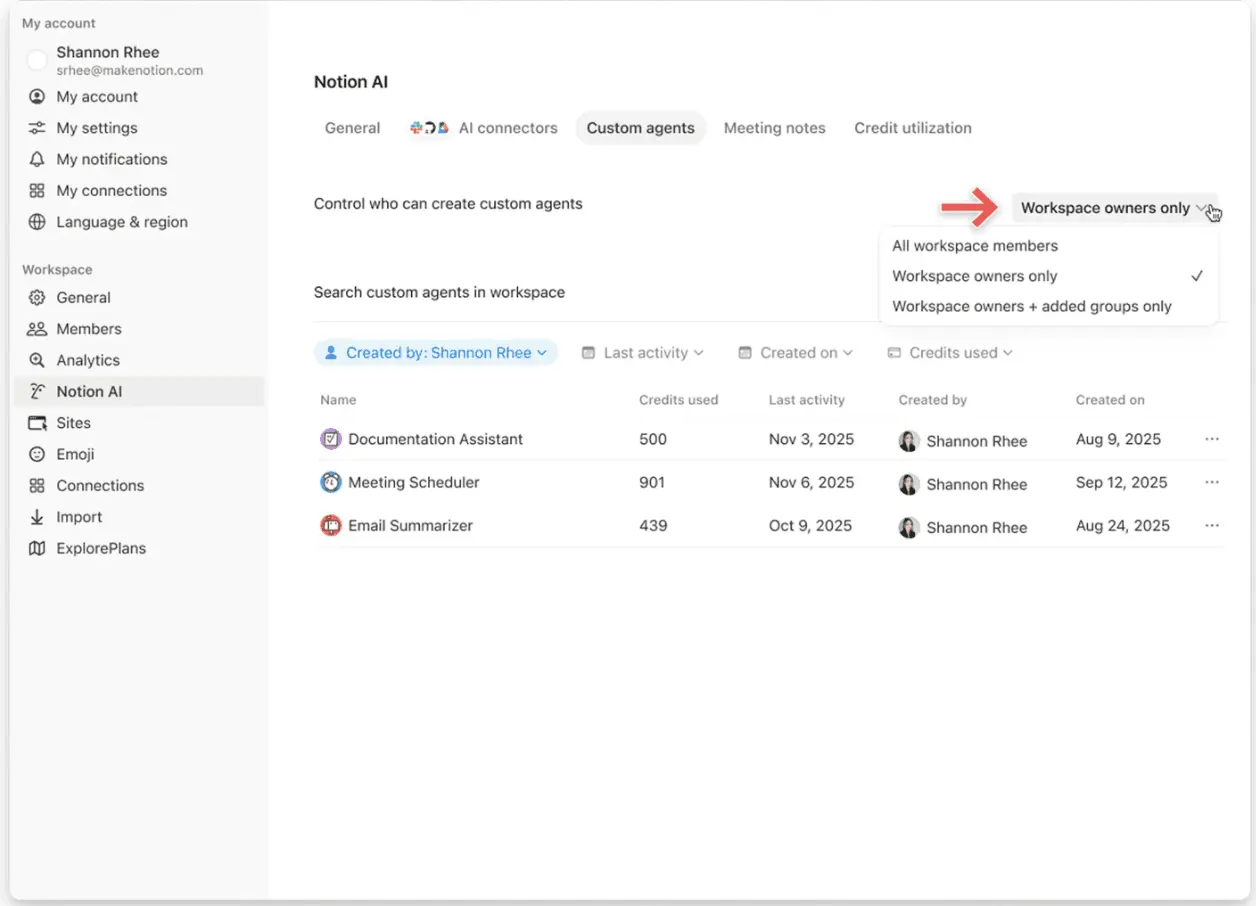
Control who can create Custom Agents (everyone, workspace owners only, or selected members).
3. Intervene quickly to stop usage
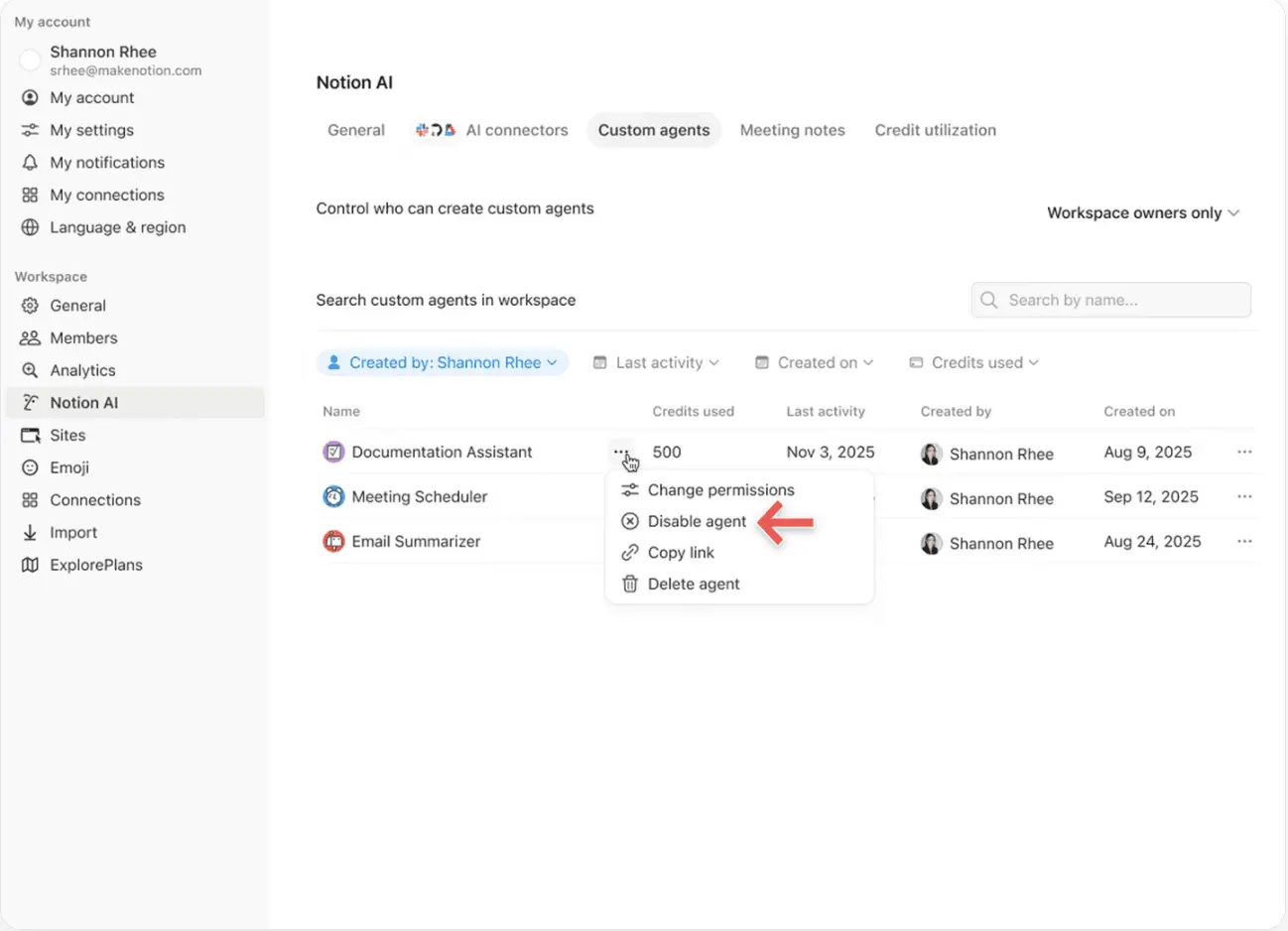
Pause or switch off a Custom Agent anytime to immediately stop credit usage while you review activity or adjust the agent.
4. Use Insights to optimize performance
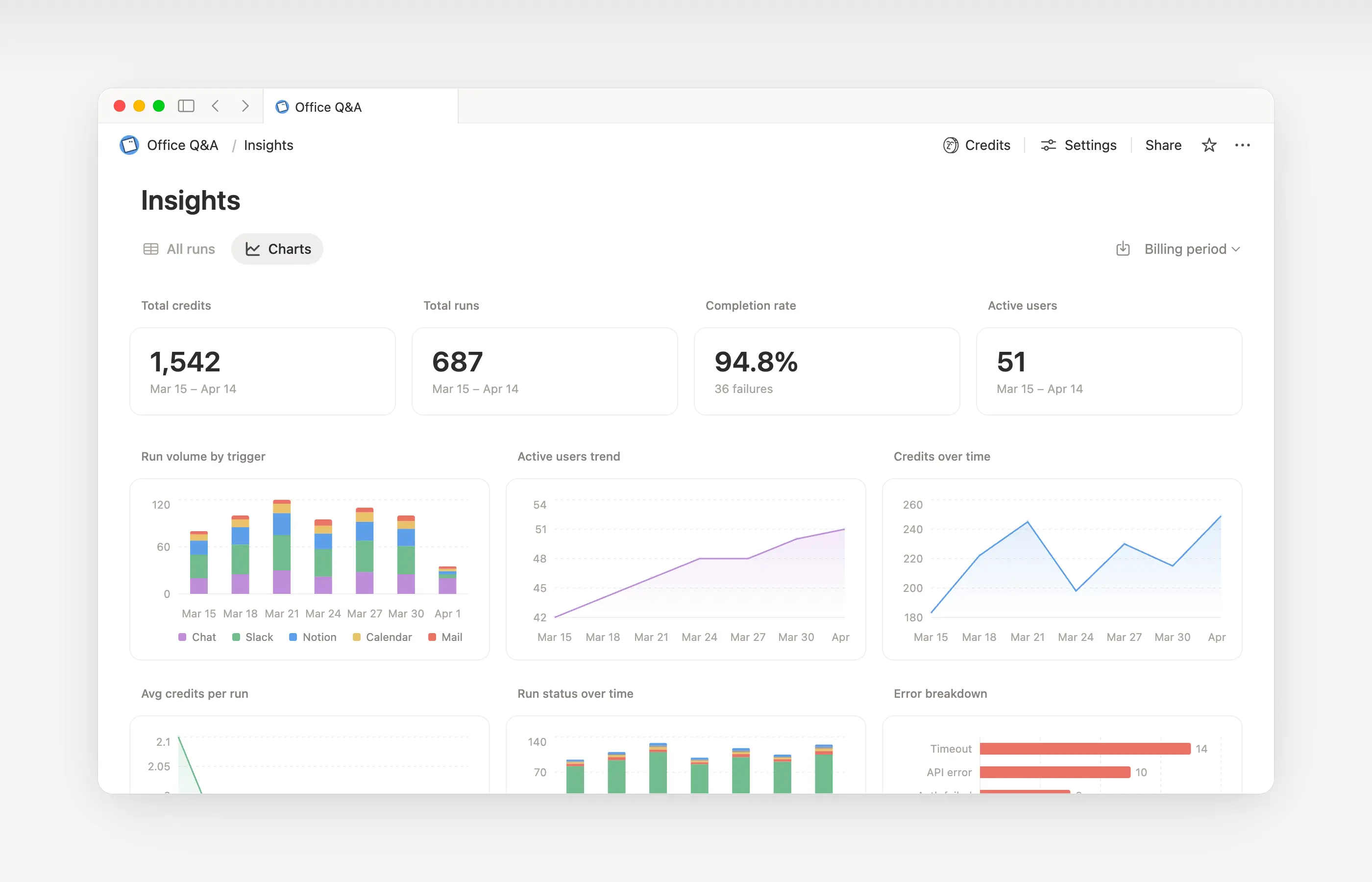
Insights helps Custom Agent creators and workspace admins understand activity so they can make targeted updates that improve performance. Use Insights to spot runs that take extra steps, fail and retry, or use a more expensive model than the job requires. Then, update the agent’s instructions or settings so it runs more efficiently.
Open Insights directly within an agent to:
Monitor your Custom Agent’s activity and credit usage.
Identify runs that are more expensive than expected.
Review what models, tools, and triggers were used.
Find and fix failed runs so your agent works more reliably.
Learn more about how to use Insights to reduce costs and improve a Custom Agent →

Learn what Custom Agents are and how they work.
Learn how Custom Agents access information, how sharing works, and what admins can control: Custom Agents sharing and permissions →
See more best practices on optimizing Notion credits and efficiency for Custom Agents in an admin’s guide to getting started with Custom Agents →
Pertanyaan Umum
Apa yang terjadi jika kredit Notion kami habis?
Apa yang terjadi jika kredit Notion kami habis?
Jika ruang kerja Anda tidak memiliki cukup kredit Notion, Agent Kustom akan dijeda secara otomatis hingga terjadi Pengaturan ulang kredit atau admin menambahkan lebih banyak kredit.
Bagaimana admin mendapatkan pemberitahuan sebelum kredit Notion habis?
Bagaimana admin mendapatkan pemberitahuan sebelum kredit Notion habis?
Admin menerima pemberitahuan dalam aplikasi (dan email) saat ruang kerja Anda mencapai 80% dan 100% dari penggunaan kredit Notion, sehingga Anda memiliki waktu untuk menyesuaikan sebelum Agent Kustom dijeda.
Bagaimana cara saya membeli lebih banyak kredit Notion?
Bagaimana cara saya membeli lebih banyak kredit Notion?
Admin dapat membeli kredit Notion baik di dalam produk maupun melalui Tim akun mereka. Pelajari lebih lanjut tentang cara membeli kredit Notion.
Bagaimana cara kerja perubahan kredit Notion di tengah bulan?
Bagaimana cara kerja perubahan kredit Notion di tengah bulan?
Jika Anda menambah kredit di tengah periode layanan bulanan Anda, kredit tambahan akan segera tersedia untuk periode layanan saat ini. Anda akan ditagih untuk jumlah kredit berulang yang lebih tinggi pada awal tanggal layanan bulanan Anda berikutnya.
Jika Anda mengurangi kredit di tengah periode layanan bulanan Anda, jumlah yang lebih rendah akan berlaku pada awal periode layanan berikutnya. Sejak saat itu, Anda akan ditagih untuk jumlah kredit berulang yang lebih rendah setiap bulan.
Saya bekerja sama dengan Tim akun untuk membeli kredit Notion. Apa yang terjadi jika saya meningkatkan, memperluas, atau memperbarui paket Business atau Paket Perusahaan saya, yang mencakup Kredit Notion Tahunan, di tengah periode penagihan saya?
Saya bekerja sama dengan Tim akun untuk membeli kredit Notion. Apa yang terjadi jika saya meningkatkan, memperluas, atau memperbarui paket Business atau Paket Perusahaan saya, yang mencakup Kredit Notion Tahunan, di tengah periode penagihan saya?
Anda akan mendapatkan kredit prorata untuk Kredit Notion Tahunan prabayar yang tidak terpakai yang setara dengan nilai yang lebih rendah dari:
Jumlah dolar dari Kredit Notion Tahunan yang tersisa dan tidak terpakai, atau
Biaya Kredit Notion Tahunan yang diprorata untuk sisa waktu dalam masa langganan
Kredit ini berlaku ketika Forms pemesanan Business atau Paket Perusahaan baru menggantikan Forms Anda saat ini sebelum akhir masa langganannya. Kredit Notion tidak memiliki nilai tunai. Kredit apa pun berlaku untuk paket baru.
Apakah Autofill menggunakan Kredit Notion?
Apakah Autofill menggunakan Kredit Notion?
Autofill memiliki dua opsi: Basic dan Agent Kustom.
Basic Autofill disertakan dalam paket Business dan Paket Perusahaan, serta tidak menggunakan Kredit Notion.
Agent Kustom Autofill menggunakan Kredit Notion karena dijalankan dengan kemampuan Agent Kustom (seperti menggunakan konteks yang lebih kaya dan penalaran yang lebih canggih).
Apa yang terjadi pada Agent Kustom jika saya menurunkan paket saya?
Apa yang terjadi pada Agent Kustom jika saya menurunkan paket saya?
Jika Anda menurunkan paket Notion Anda ke Free atau Plus, semua Agent Kustom yang ada akan dinonaktifkan, tetapi tidak dihapus. Anda dapat melihat (tetapi tidak mengedit) halaman obrolan dan pengaturan Agent Kustom. Agent Kustom dapat dilanjutkan jika Anda meningkatkan kembali ke Business atau Paket Perusahaan.
Bisakah saya membeli kredit Notion jika saya mengelola langganan saya melalui App Store atau Google Play?
Bisakah saya membeli kredit Notion jika saya mengelola langganan saya melalui App Store atau Google Play?
Tidak secara langsung. Jika langganan Notion Anda dikelola melalui toko aplikasi seluler (Apple App Store atau Google Play), Anda tidak akan dapat membeli kredit Notion dari dalam Notion.
Untuk membeli kredit, Anda perlu:
Membatalkan langganan toko aplikasi seluler Anda.
Tingkatkan ke paket Notion secara langsung di notion.com (Business atau Paket Perusahaan, dengan AI disertakan).
Setelah langganan baru Anda aktif, admin dapat membeli kredit Notion dari
Pengaturan→Akses & penagihan→Kredit Notion.
Pastikan paket baru Anda menyertakan AI sebelum membeli kredit. Kredit Notion hanya tersedia pada paket Bisnis dan Paket Perusahaan.