نشر موقع Notion
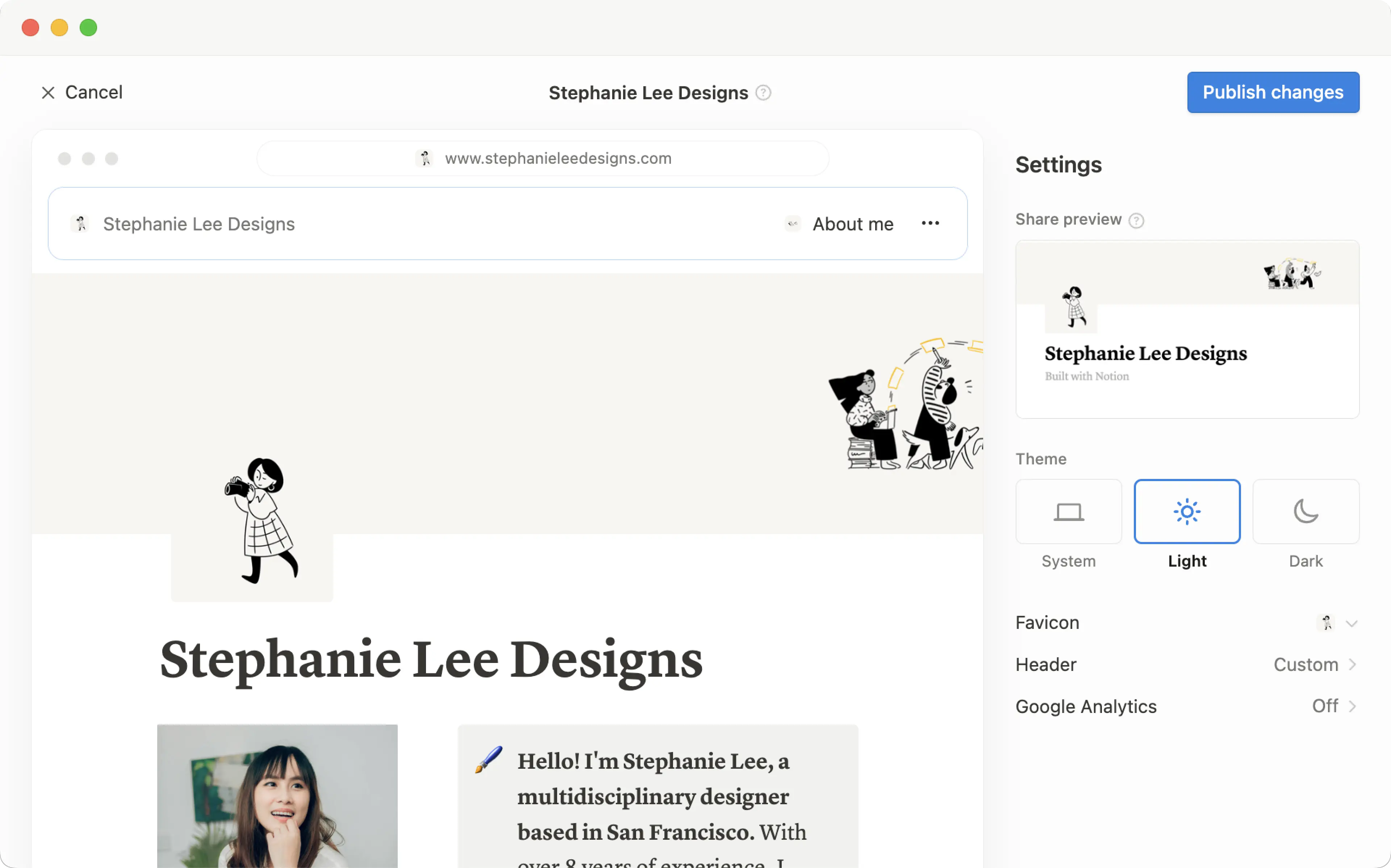
يمكن تحويل أي صفحة تنشئها في Notion إلى موقع Notion جميل بنقرة واحدة فقط. انشر مدونة، أو سيرة ذاتية، أو ملف أعمال، أو قائمة وظائف، أو صفحة مقصودة — فالإمكانيات واسعة بقدر اتساع الويب نفسه 🪄
الانتقال إلى الأسئلة الشائعةباستخدام مواقع Notion، يمكنك:
انشر عدداً غير محدود من الصفحات على الويب.
إذا كنت مشتركاً في خطة مدفوعة، فستتمكن أيضاً من فتح تخصيصات إضافية لموقعك تتضمن تحسين محركات البحث، والسمات، والتكامل مع Google Analytics، والمزيد. كما ستتمتع بالقدرة على شراء إضافة لاستخدام نطاقاتك المخصصة الحالية مع المواقع، والمزيد.
تعرّف على المزيد حول توفر ميزة مواقع Notion وتسعيرها من هنا →

Note:
Making a Notion page public via Notion Sites is different from making a Notion page public using the
Anyone on the web with linksetting in a page’sSharemenu. Learn more about this general access setting here →Workspace owners on the Enterprise Plan can choose to prevent Notion Sites from being published. Learn how here →
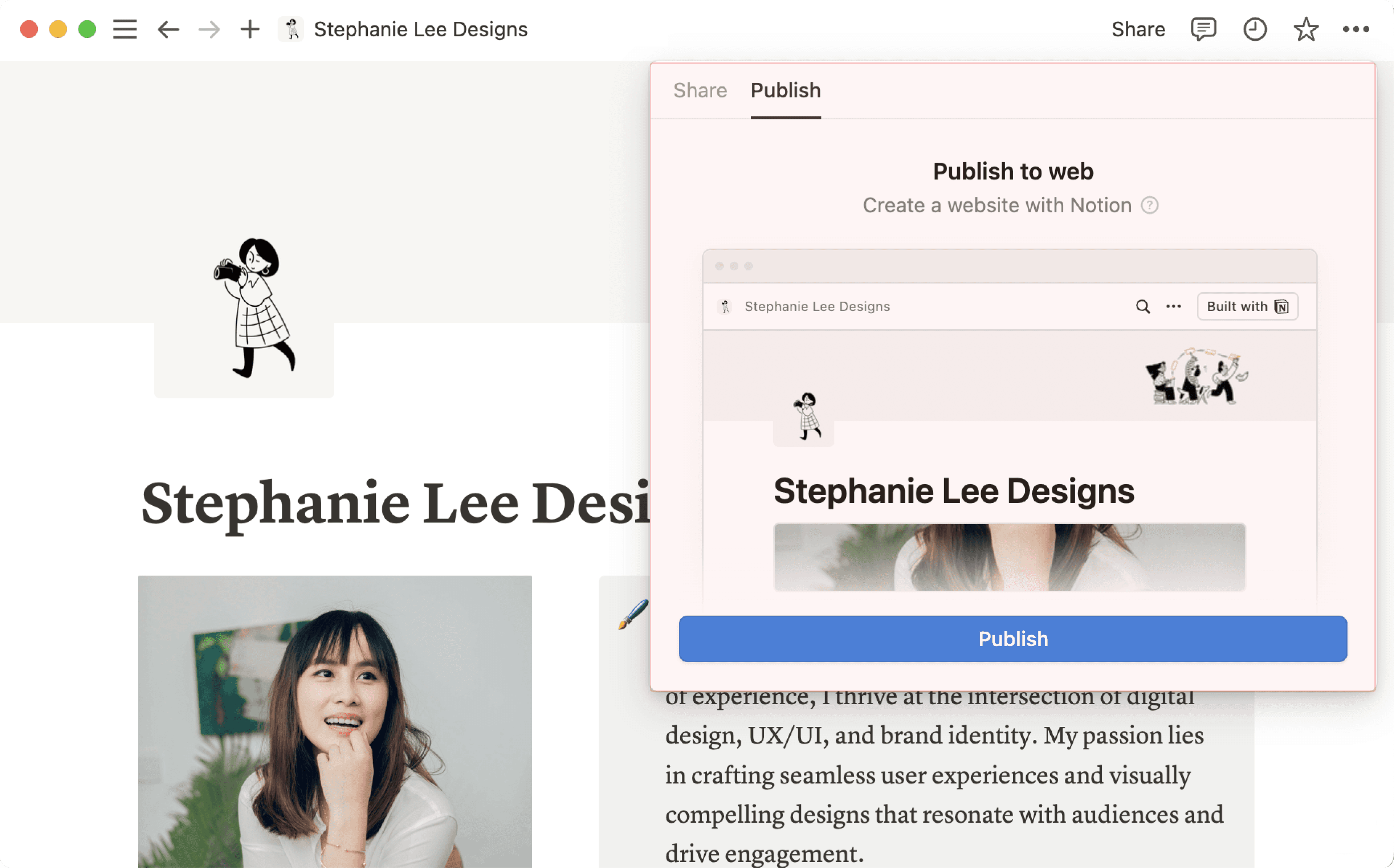
لنشر موقع Notion:
افتح الصفحة التي تريد نشرها وحدد
مشاركةفي الأعلى.افتح علامة التبويب
نشر.حدد
نشر.
حدد عرض الموقع لرؤية موقع Notion الخاص بك مباشراً على الويب! بمجرد إجراء تغييرات على المحتوى في صفحة Notion منشورة، سيتم تحديث الموقع تلقائياً.
اجعل موقعك قابلاً للتضمين
قم بتضمين أي من صفحات Notion المنشورة الخاصة بك—كالنماذج، والمخططات، وقواعد البيانات، والمزيد—في مواقع الويب غير التابعة لـ Notion.
في صفحة منشورة، انقر على
تضمين هذه الصفحة.في نافذة التضمين المنبثقة، انقر على
نسخ هذا الرمز.اختيارياً، يمكنك استخدام خيار قائمة قابلة للطي لـ
إظهار عنوان الصفحة
الصق الرمز في ملف HTML الخاص بموقع الويب، وإذا كنت تستخدم أداة إنشاء مواقع ويب، فمن المحتمل أن يكون هذا عبارة عن كتلة تعليمات برمجية.
Note: Publishing a Notion page to the web means all of its subpages will be published too. Make sure all your page’s subpages are good to go before you hit publish!

Learn how to build a beautiful, ready-to-publish Notion Site here →
بمجرد نشر موقع Notion الخاص بك، افتح الصفحة المنشورة في Notion واختر مشاركة في الأعلى → نشر. من هذه القائمة، يمكنك:
انسخ الرابط الخاص بموقع Notion المباشر الخاص بك حتى تتمكن من مشاركته مع الآخرين.
إذا كنت مشتركاً في خطة مدفوعة، فيمكنك تخصيص الرابط المختصر (slug) لموقع Notion الخاص بك، وهو المسار الذي يلي نطاقك. على سبيل المثال، في الرابط
notion.site/my-slug، سيكونmy-slugهو الرابط المختصر. لتخصيص هذا، انقر على الرابط المختصر الحالي، وأدخل الرابط المختصر المفضل لديك، وانقر علىحفظ.يمكن أن تتكون الروابط المختصرة من أحرف وأرقام وواصلات. لا يُسمح بأي أحرف خاصة أخرى.
يمكن أن يحتوي الرابط المختصر الخاص بك على ما يصل إلى 60 حرفاً.
لا يمكن أن تحتوي الصفحة الرئيسية على روابط مختصرة.
سيتعين عليك إعداد الروابط المختصرة يدوياً لكل موقع من مواقع Notion الخاصة بك. لن يتم تطبيق الرابط المختصر لصفحة معينة تلقائياً على أي صفحات فرعية.
لا يمكنك استخدام نفس الرابط المختصر عبر الصفحات في مساحة عمل واحدة، حتى لو تم نشر تلك الصفحات على نطاقات مختلفة.

Important: Once you permanently delete a published page, its slug cannot be reused. If you think you might want to use the same slug again, update the slug before deleting the page.
اختر
تخصيص الموقعلتخصيص موقعك بشكل أكبر. تعرف على المزيد حول تخصيص موقعك في هذه المقالة →اختر
فهرسة محركات البحثوقم بتفعيل خيار قائمة قابلة للطي لـقابل للاكتشاف على الويبلجعل موقعك قابلاً للبحث على الويب. إذا كنت مشتركاً في خطة مدفوعة، فستتمكن أيضاً من تعديل عنوان الرابط والوصف الخاص بك لتحسين محركات البحث.قم بتفعيل خيار قائمة قابلة للطي لـ
تكرار كقالبللسماح لزوار موقعك بتكرار موقع Notion الخاص بك كصفحة Notion في مساحة العمل الخاصة بهم.اختر
تضمين هذه الصفحةوقم بتفعيل خيار قائمة قابلة للطي لـإظهار عنوان الصفحةأو اخترنسخ الرمزلتضمين موقع Notion الخاص بك في صفحة أخرى.قم بإدارة جميع مواقعك عن طريق اختيار
جميع المواقع المنشورة.
Note:
Notion Sites can take up to four weeks to be indexed and appear in search results.
If you choose to sell templates directly on Marketplace, your existing paid templates (at their existing Notion Sites links) will be made available for purchase directly on Marketplace. This means that users who access your templates' existing Notion Sites links via a third-party platform won’t be able to duplicate your templates. Make sure to duplicate your template and set it up at a new Notion Site link that you can use for your listing on the third-party platform.
Note: When you publish a Notion page to the web or set sharing access for a Notion page to Anyone on the web with link, the webpage's metadata will include the names, profile photos, and email addresses associated with any Notion users that have contributed to the page.
عند نشر موقع Notion:
يمكن لأي شخص على الويب عرضه.
يتم أيضاً نشر الصفحات الفرعية افتراضياً، إلى جانب أي من صفحاتها الفرعية. يمكنك تقييد أذونات الصفحات الفرعية لإخفائها عن العرض العام!
إذا كان موقع Notion الخاص بك يحتوي على قاعدة بيانات، فيمكن للمشاهدين استخدام خيار قائمة قابلة للطي للتبديل بين طرق العرض وفتح الصفحات الموجودة بداخلها.
بينما تقوم بإجراء تغييرات على المحتوى في صفحة Notion الخاصة بك، سيتم تحديث الموقع تلقائياً.
If you’re on a paid plan, you can do even more to tailor the experience for your Site’s visitors! Learn how in this article →
Even if your Notion Site has been unpublished, it’s possible your page’s general access settings have been set to Anyone on the web with link, which allows people who have the link to your page to access it.
To ensure your page’s contents aren’t shared publicly, turn this setting off by clicking Share at the top of your Notion page, opening the dropdown next to Anyone on the web with link, and clicking Remove.
لإزالة موقع Notion الخاص بك من الويب:
افتح الصفحة التي تريد إلغاء نشرها وحدد
مشاركةفي الأعلى.افتح علامة التبويب
نشر.حدد
إلغاء النشر.
إذا كنت مالك مساحة عمل في الخطة المؤسسية، فيمكنك منع أعضاء مساحة العمل من نشر مواقع Notion. للقيام بذلك، يمكن لمالكي مساحة العمل:
انتقل إلى
الإعدادت→الأمان.في علامة التبويب
الأمان، قم بتفعيل خيار قائمة قابلة للطي لـتعطيل نشر المواقع والنماذج والروابط العامة.
سيتم إيقاف أي مواقع موجودة بالفعل على الويب بمجرد تفعيل هذا الإعداد. لاحظ أن تفعيل هذا الإعداد سيمنع أيضاً أعضاء مساحة العمل الخاصة بك من مشاركة النماذج على الويب.

الأسئلة الشائعة
Does Notion support custom domains?
Does Notion support custom domains?
Learn how to claim a notion.site domain or connect a custom domain to your Notion Site here →
Can you link to a specific section of a page?
Can you link to a specific section of a page?
You can use a table of contents in your public page to create anchor links to its headings.
If I change my workspace domain name, will my public page URLs still work?
If I change my workspace domain name, will my public page URLs still work?
If you change your workspace domain, any existing links starting with the previous domain will no longer work. You'll need to share the new link. To find the new link, open the published page in Notion and select Share at the top → Publish. Find the URL at the top and select 🔗 next to it to copy it.
I shared my public page URL but it takes people to a page with a "Continue to external site by following the link below" error message. What did I do wrong?
I shared my public page URL but it takes people to a page with a "Continue to external site by following the link below" error message. What did I do wrong?
Make sure you’ve shared the link to the published page, and not the version of the page in your Notion workspace! The link should begin with your Notion workspace domain name. To find it, open the published page in Notion and select Share at the top → Publish. Find the URL at the top and select 🔗 next to it to copy it.
Can I password protect a page?
Can I password protect a page?
Unfortunately, not at the moment. If the person you want to share a page with has a Notion account, you can share your page privately by selecting Invite a person in the Share menu at the top of a page.